MICROSOFT 365 COPILOT
Before you turn on Copilot, know exactly what it will see.
Microsoft 365 Copilot respects your existing permissions. Every overshared site, forgotten link, and unlabeled file becomes instantly discoverable by AI. This guide covers what Microsoft says to fix first, and the tools to fix it.
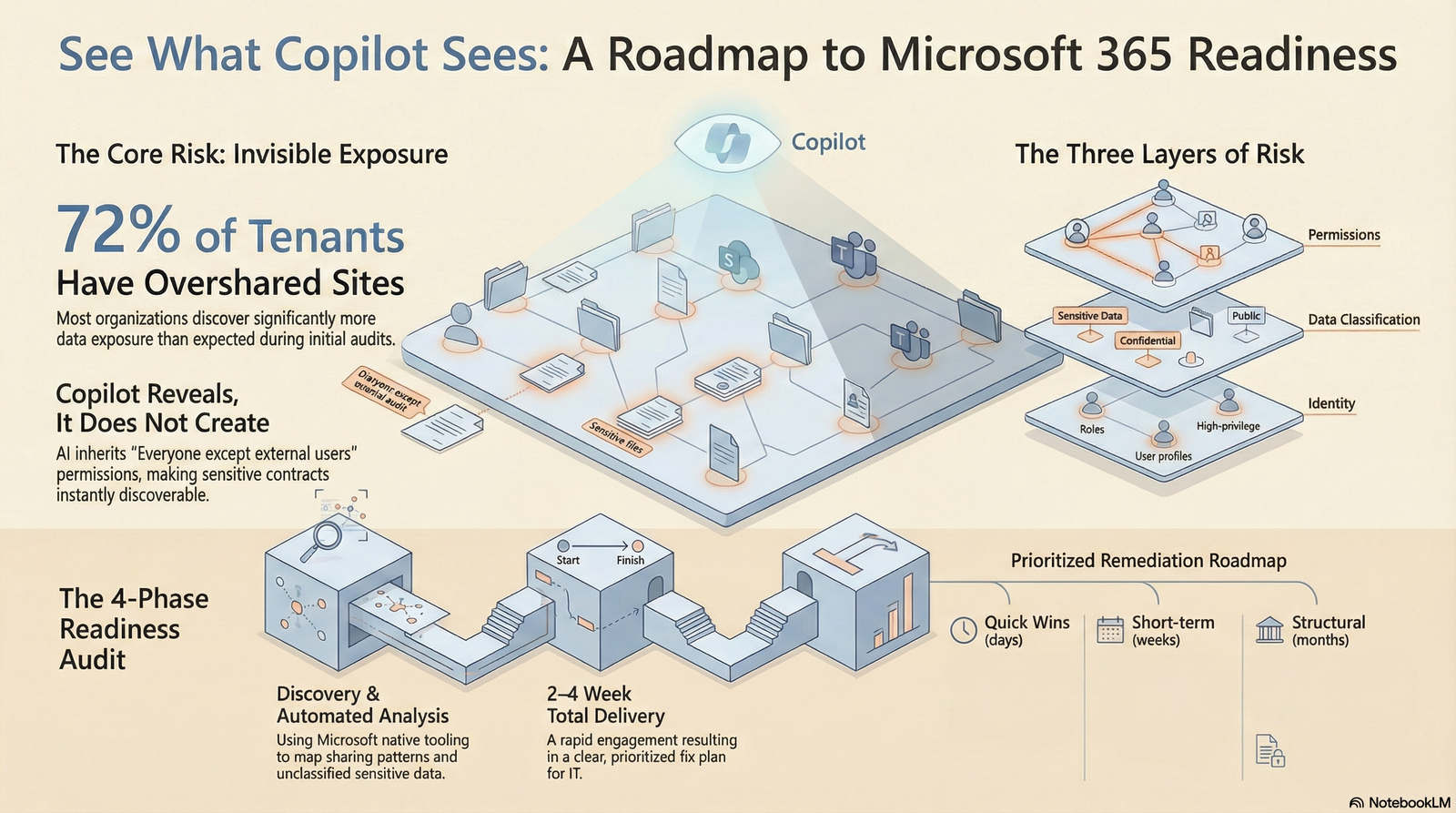
THE CORE RISK
Copilot does not create your data exposure. It reveals it.
Copilot is grounded in Microsoft Graph. It can see everything your users can see. If your permissions are messy, Copilot makes that mess instantly searchable and summarizable.
Microsoft is explicit: Copilot "builds on the work you have already done to secure your environment" and "honors your security and data protection controls." That is the point. If those controls are weak, Copilot inherits the weakness.
Files no one was meant to find
Compensation plans, legal contracts, acquisition discussions, sitting in SharePoint sites with "Everyone except external users" access. Your people never found them by clicking around. Copilot finds them in seconds.
Years of accumulated access
As teams grow and shift, permissions accumulate. A project folder from 2019 still has 40 people with edit access. Copilot inherits every one of those permissions.
Unlabeled data is invisible protection
Without Microsoft Purview sensitivity labels, Copilot cannot know a document is confidential. It will summarize your HR data or financial projections for anyone who asks.
SCOPE OF ASSESSMENT
A complete view of your Microsoft 365 risk surface.
Microsoft's own readiness framework covers three layers. All three must be in order before broad Copilot rollout.
Permissions and Sharing
- SharePoint site-level permissions review
- Unique vs. inherited permission patterns
- "Everyone except external users" exposure via Data Access Governance (DAG) reports
- Anonymous and external sharing links
- Teams channel and guest access
- OneDrive sharing link inventory
- Orphaned sites and inactive Teams
- Stale guest accounts
- Restricted Access Control (RAC) readiness for critical sites
Sensitive Data Discovery
- Microsoft Purview Content Explorer scan (PII, financial, legal, health data)
- Documents with no sensitivity label
- High-risk content in broadly shared locations
- DSPM for AI baseline posture, custom data risk assessments with item-level scanning (2026, preview)
- Unlabeled files accessible to large groups
- External-facing content with sensitive data
- DLP policy coverage for Copilot prompts (preview, can block sensitive info types in prompts)
Identity and Copilot Configuration
- Entra ID health check
- MFA coverage via Conditional Access baseline policies
- Conditional Access policy review (block legacy auth, secure MFA registration)
- Privileged Identity Management (PIM) for Copilot admin roles
- Guest and external user access review
- Microsoft 365 Copilot admin center settings
- Audit logging and eDiscovery readiness (Copilot interaction logs, fixed Aug 2025)
- Restricted SharePoint Search configuration (temporary mitigation, up to 100 sites)
- Semantic Index exclusions via Purview DLP

MICROSOFT'S RECOMMENDED SEQUENCE
Fix in this order. Microsoft's blueprint says so.
Microsoft's oversharing blueprint and data readiness articles define a clear phased approach: Pilot, Deploy, Operate. This is the sequence before broad rollout.
Identity and Conditional Access baseline
Ensure MFA is enforced for all users, legacy authentication is blocked, and Conditional Access policies cover Copilot-enabled accounts. Scope PIM for all Copilot admin roles.
Discover oversharing
Use SharePoint Data Access Governance (DAG) reports to find broadly shared sites. Run Purview DSPM for AI custom data risk assessments to find item-level oversharing in SharePoint. Know what Copilot can reach before it does.
Apply sensitivity labels and access controls
Label your most sensitive content using Microsoft Purview. Apply Restricted Access Control (RAC) to critical sites. Configure DLP policies to block sensitive information types from Copilot prompts (currently preview).
Use Restricted SharePoint Search for pilot
Restrict Copilot to an allowed list of up to 100 curated sites during initial rollout. This is Microsoft's documented temporary mitigation that limits both search and Copilot results while broader governance is addressed.
Expand in phases with continuous monitoring
Use Purview, SharePoint Advanced Management, and Entra ID Governance to monitor and remediate new risks as Copilot rolls out. Follow Microsoft's Pilot, Deploy, Operate model.
DELIVERABLES
Clear outputs. No jargon.
Every deliverable is designed for both IT leaders and business executives.
Executive Summary
Plain-English overview of Copilot readiness posture, top three risks, and recommended next steps. Written for your CISO, CTO, or board.
Technical Findings Report
Every finding documented with the affected site, user group, or configuration setting. Organized by risk category. Your IT team knows exactly what to fix first.
Prioritized Remediation Roadmap
Findings organized into Quick Wins (days), Short-term fixes (weeks), and Structural improvements (months). Includes effort estimates and direct Microsoft documentation links for every action.
RIGHT FIT
Built for organizations deploying Copilot on Microsoft 365.
Microsoft 365 organizations
If your team lives in Teams, SharePoint, Outlook, and OneDrive, you have the permission complexity that makes a readiness check essential.
SWEET SPOTUnder pressure to enable Copilot
Leadership is pushing. Competitors are moving. You want to say yes, but not before you know what you are exposing. A readiness audit gives you the data to move confidently, not blindly.
COMMON SCENARIOIn regulated or sensitive industries
Professional services, financial services, healthcare-adjacent, government contractors, and nonprofits handling member data all have higher stakes. Microsoft's December 2024 Cohasset Associates compliance assessment explicitly covers Copilot for financial services regulatory requirements.
HIGH STAKESYou might not be ready yet if:
- You have never audited SharePoint permissions
- Guest access was enabled years ago and never reviewed
- You do not use sensitivity labels or Purview
- You are not sure what "Everyone except external users" means in your environment
- You have old project Teams that nobody owns anymore
This is probably not for you if:
- You have fewer than 25 seats on Microsoft 365
- You do not plan to use Copilot in the next 12 months
- You already completed a formal Purview and permissions audit in the last 6 months
- You have a dedicated security team running regular access reviews

COMMON QUESTIONS
What people ask before they start.
NEXT STEP
Know your Copilot risk before, or after, you go live.
A structured readiness audit takes 2 to 4 weeks and gives your IT team and leadership a shared, clear picture of what needs to happen. No jargon. No vague findings. A prioritized plan you can act on.