One page
The Tenant Agent Reconciliation Framework, on a single page
What it is, when to use it, and the one action it produces. v1.0, August 2026. The same text as this page, laid out to print or share.
OPERATIONAL FRAMEWORKS
Five steps for reconciling what your Microsoft tenant actually contains against what your organization formally approved. The gap between those two numbers is where governance work begins.
The reconciliation step most organizations skip is matching display names in the tenant against the authorization record. Agents get renamed, repurposed, or inherited across team changes. By step three of an examination, that gap is already visible.
Published under CC BY 4.0. Free to reproduce, adapt, translate, and use commercially, including inside your own governance program, with attribution to Sougata Roy and a link to this page. Attribution is a condition of the license. Claiming authorship is not attribution. Full terms at sougataroy.com/rights
Cite this framework
Sougata Roy, "The Tenant Agent Reconciliation Framework", Version 1.0, April 2026, https://sougataroy.com/frameworks/tenant-agent-reconciliation
Step 1
Surface
Establish the actual count of AI agents operating in the environm...
Step 2
Reconcile
Document the minimum set of facts required to govern each discove...
Step 3
Classify
Assign a risk tier to each cataloged agent to prioritize governan...
Step 4
Govern
Apply governance requirements proportional to each agent's risk t...
Step 5
Sustain
Maintain catalog accuracy over time and prevent new shadow agents...
Version 1.0 - Published April 2026
Type
Reconciliation framework
Version
v1.0
Published
August 2026
Time to use
45 min review / 2 hour sprint
Audience
IT, security, AI governance, and business operations
Output
A reconciled living agent catalog
Last verified
Not recorded
Re-verification cadence
Monthly, with urgent updates when cited primary sources change.
Use this first
Reconcile approved records with tenant reality so the organization knows what is actually operating.
Primary object
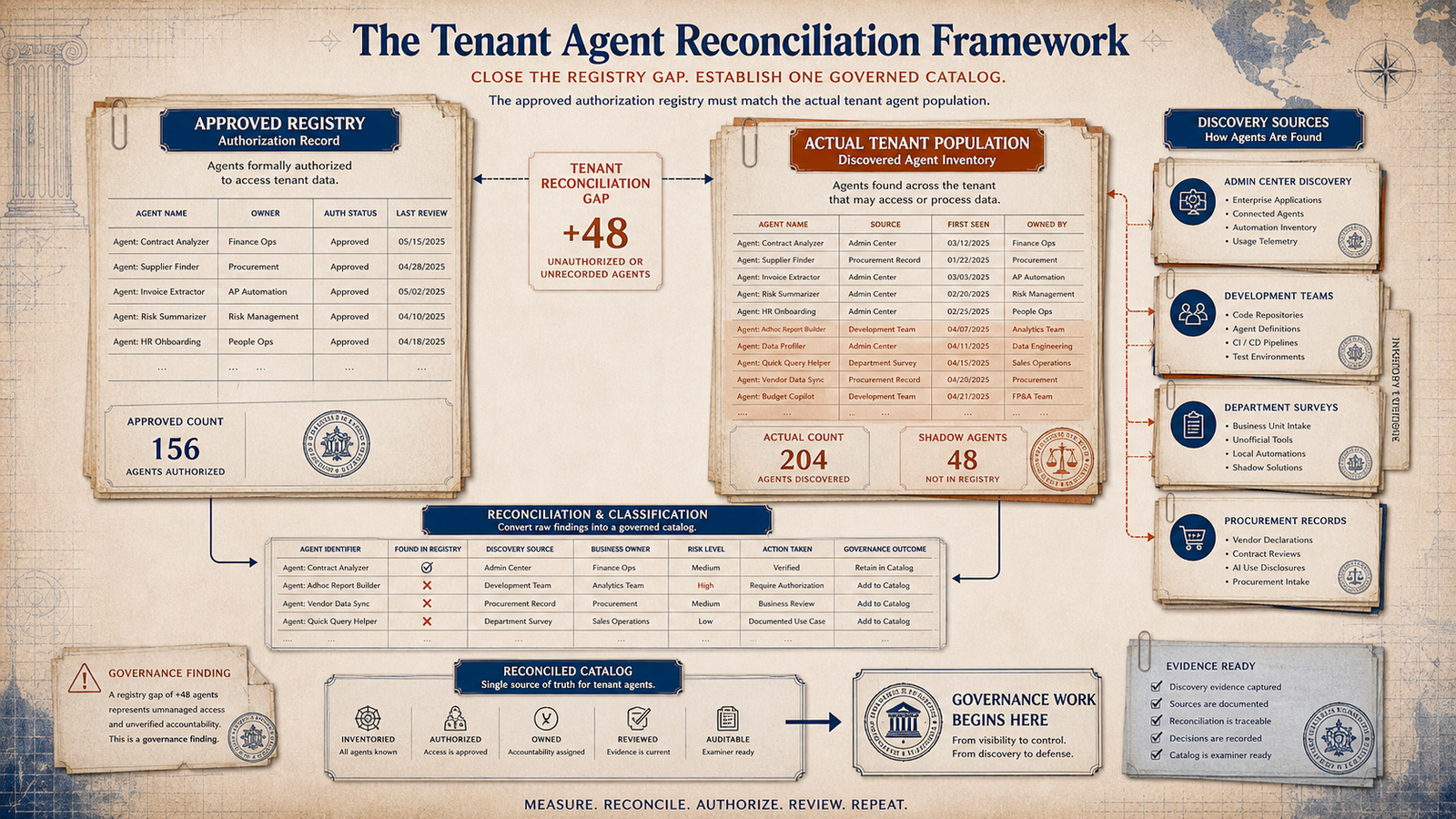
Use as a working artifact
Primary object
Compare approved inventory, platform discovery, and business-unit evidence before assigning coverage or risk.
Limitation
This object can reveal discrepancies between known and discovered agents. It cannot guarantee discovery of agents outside the available telemetry or prove that every catalog field is current.
Revision history
Version 1.0, August 2026: Page structure reordered to place tenant reconciliation before explanatory content; added a constructed completed example. Framework definition and version unchanged.
Copyable citation
Sougata Roy, "The Tenant Agent Reconciliation Framework," Version 1.0, August 2026, https://sougataroy.com/frameworks/tenant-agent-reconciliation
One page
What it is, when to use it, and the one action it produces. v1.0, August 2026. The same text as this page, laid out to print or share.
The registry gap
The framework starts from the difference between the approved list and the actual tenant population. If the registry is not tested against multiple discovery channels, it may describe the governed minority while the operating population keeps growing elsewhere.
Use this section to frame the exercise: the question is not whether a registry exists, but whether it matches reality.
Shadow agents are not built by rogue employees. They are built by motivated employees solving real problems with tools their organization gave them access to.
Most organizations surface agents in step one that their Authorization Registry does not contain. The gap between the two counts is the Tenant Reconciliation Gap. That is where governance work begins.
Governance question
Does your organization know the complete count of AI agents currently operating in its environment - not the count that were formally approved, but the count that are actually running?
Registry gap
The exercise begins by comparing the authorization record against discovery sources, then converting the gap into a reconciled catalog.
Unit of count
The unit of count is defined in the Governance Readiness Matrix, and the same definition applies here.
The reconciliation model
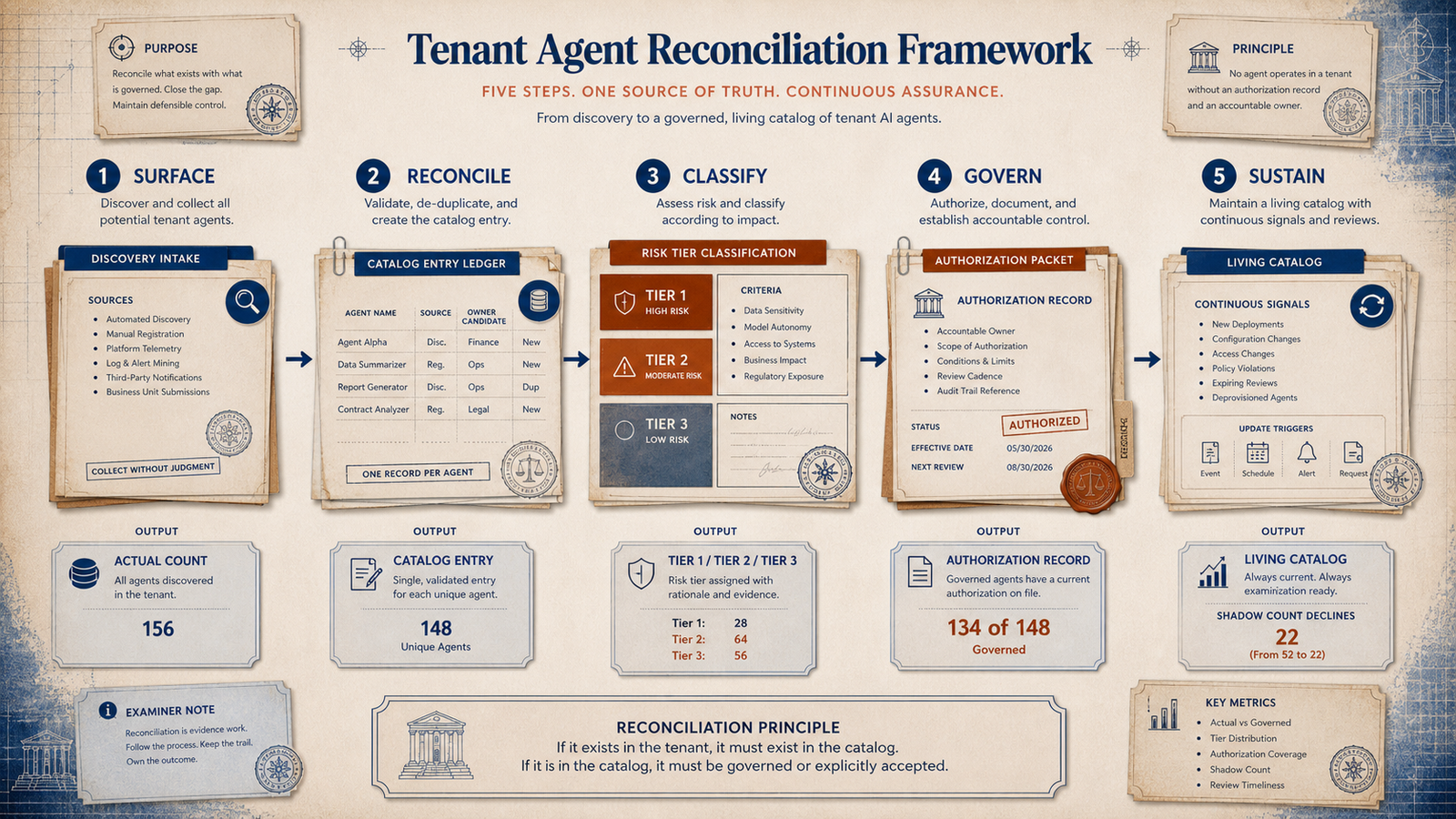
The Tenant Agent Reconciliation Framework is the organizational process for making the actual agent population visible, assessed, and governed. It has five sequential reconciliation steps. Each step produces a specific output that becomes the input to the next step.
Run the steps in order. Each output becomes the input to the next step, so skipping discovery weakens every later governance decision.
Five-step process
Each step produces evidence for the next one: discovery, catalog entry, risk tier, authorization record, and sustained review.
Establish the actual count of AI agents operating in the environment, including those that were never formally approved.
Pass / fail condition
A total agent count, a breakdown by discovery source, and an explicit statement of the shadow agent population - the agents operating without formal approval. The organizational principle: the count that matters is the actual count, not the approved count. Starting governance work from the approved list means governing the minority of the AI deployment while the majority operates without oversight.
Document the minimum set of facts required to govern each discovered agent.
Pass / fail condition
A complete catalog of discovered agents with reconciliation status for each - approved and governed, approved but ungoverned, or unapproved and ungoverned.
Assign a risk tier to each cataloged agent to prioritize governance work.
Pass / fail condition
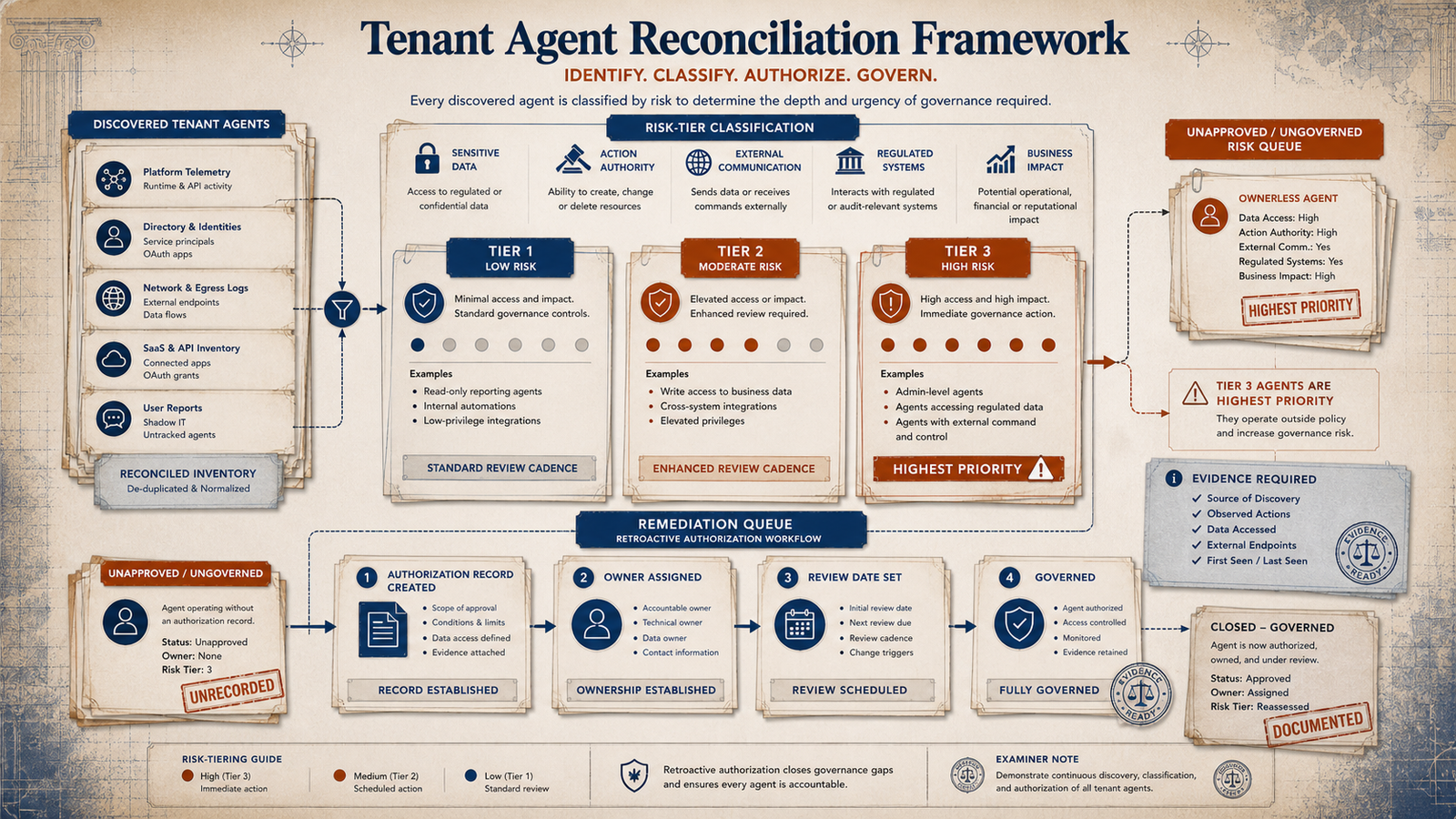
A tiered agent catalog with each agent assigned to Tier 1, Tier 2, or Tier 3, and a prioritized remediation queue based on tier and governance gap.
Apply governance requirements proportional to each agent's risk tier.
Pass / fail condition
Completed governance documentation for each agent in the catalog, filed as governance artifacts and stored beside the technical inventory.
Maintain catalog accuracy over time and prevent new shadow agents from accumulating faster than they are governed.
Pass / fail condition
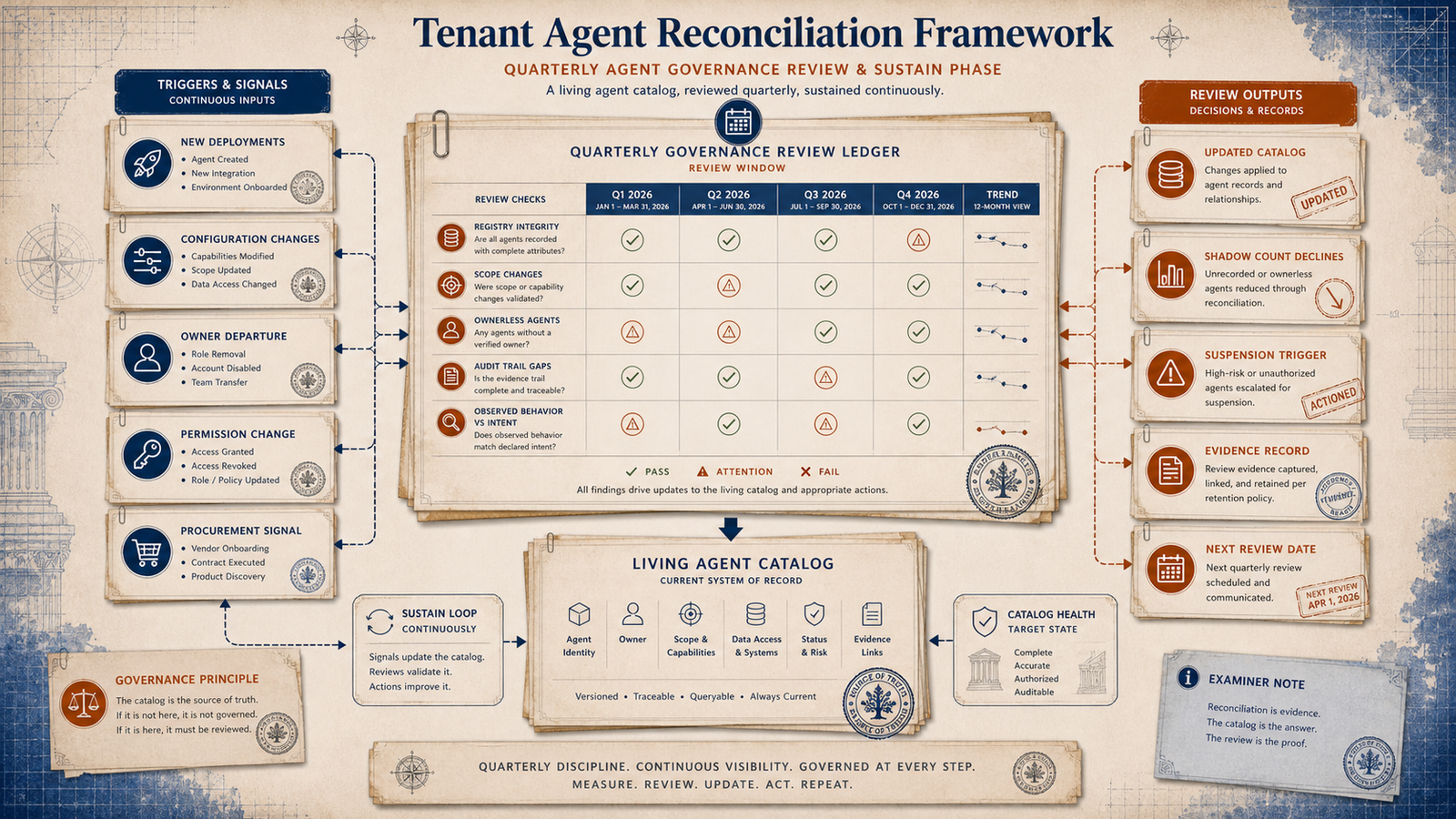
A living agent catalog with defined update triggers, a shadow agent count that declines quarter over quarter, and an intake process that new deployments pass through before going live.
What the platform covers
Agent 365 surfaces the agent inventory visible through the Microsoft 365 Admin Center and connected governance interfaces. This gives organizations a starting count from official channels.
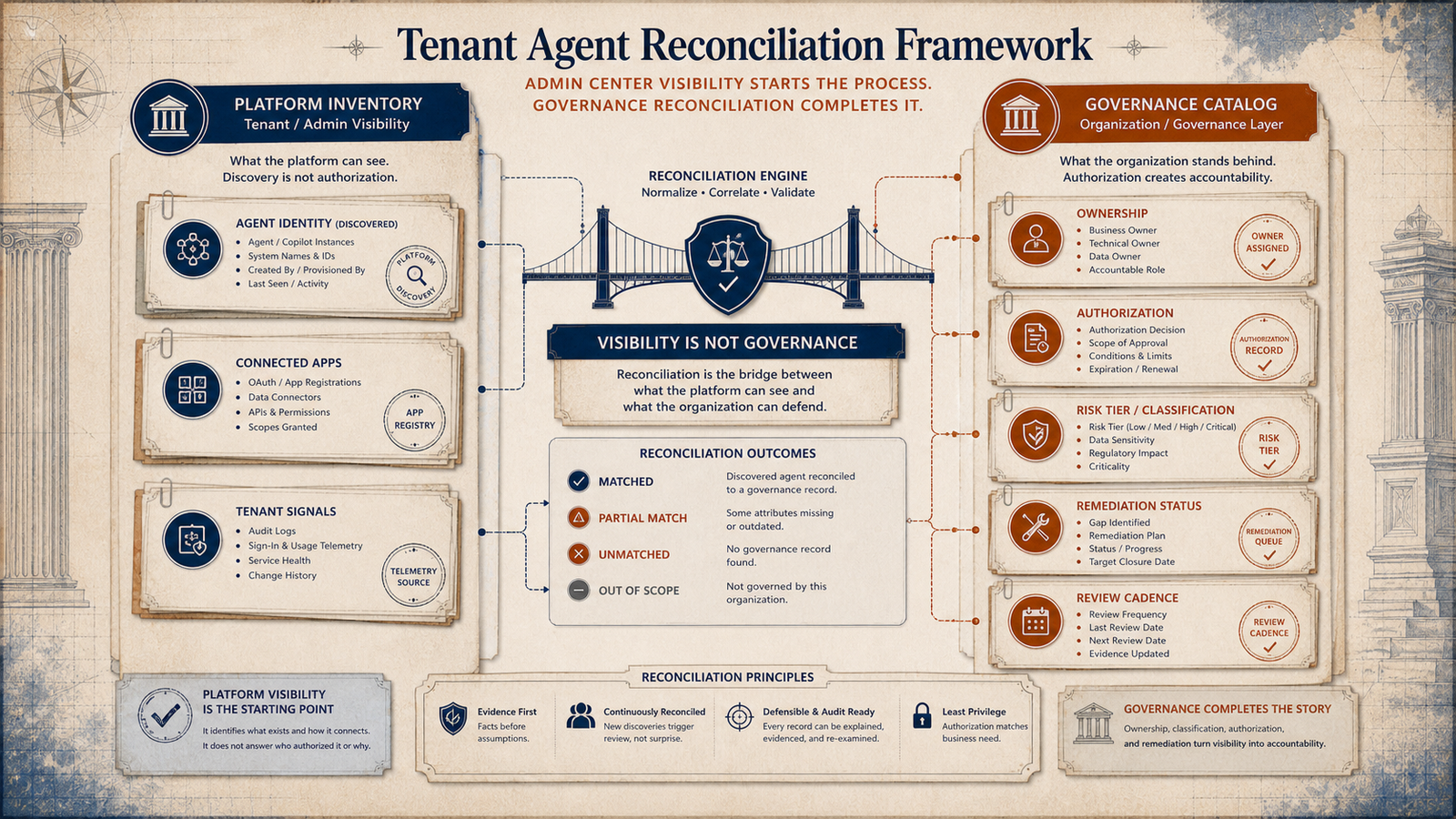
Use this section to separate platform inventory from governance inventory: the platform can surface agents, but the organization still has to reconcile ownership, authorization, classification, and remediation.
Platform boundary
Platform inventory can show what exists, but reconciliation adds ownership, authorization, risk classification, remediation status, and cadence.
What the platform covers
Agent 365 surfaces the agent inventory visible through the Microsoft 365 Admin Center and connected governance interfaces. This gives organizations a starting count from official channels.
What the framework adds
The platform can surface agents. The framework turns that visibility into an operating inventory with ownership, classification, and remediation. The discovery process works across multiple inquiry channels simultaneously - governance interfaces, development teams, department surveys, and procurement records - because no single source produces the complete count.
Use this in a meeting
The quarterly review is the evidence record for regulatory audit readiness. An organization that cannot produce quarterly review documentation for its agent portfolio is carrying unquantified governance debt regardless of how well its agents are configured.
Ask these questions with architecture, identity, security, procurement, and business owners in the same room. A missing answer becomes an assigned remediation item.
Risk-tier queue
Sensitive data, action authority, external communication, regulated systems, and business impact determine how urgently governance must act.
Quarterly rhythm
New deployments, configuration changes, owner departures, permission changes, and procurement signals feed the living catalog.
Diagnostic signal
Pass: every discovery channel has been queried. Fail: the count comes from one registry alone.
Diagnostic signal
Pass: each agent is approved and governed, approved but ungoverned, or unapproved and ungoverned.
Diagnostic signal
Pass: Tier 2 and Tier 3 gaps are prioritized. Fail: all missing records are treated as equal.
Primary sources
The page grounds the reconciliation problem in external research on shadow technology patterns and Microsoft documentation for tenant agent identity, inventory, and administration.
Use these references when the registry gap needs support for architecture, identity, or compliance stakeholders.
toriihq.com/saas-benchmark-annual-report-2026
Source: Torii, "2026 SaaS Benchmark Annual Report," February 24, 2026.
View sourcelearn.microsoft.com
Source: Microsoft Learn, "What is Microsoft Entra Agent ID?", Microsoft Agent 365 identity documentation.
View sourcelearn.microsoft.com
Source: Microsoft Learn, "Manage Copilot agents and integrated apps in the Microsoft 365 admin center."
View sourceConnected frameworks
Reconciliation produces the count. These connected frameworks use that count to score readiness, improve authorization coverage, and name the sprawl pattern.
Use these cards after the registry gap is visible and the team needs a remediation path.
Connected framework
Uses the reconciled count to calculate the governance coverage ratio and place the organization in a readiness quadrant.
Open frameworkConnected framework
Shows how authorization coverage changes as agents are discovered, governed, reviewed, or left unreconciled.
Open frameworkConnected framework
Names the proliferation pattern that tenant reconciliation is designed to surface before it becomes audit exposure.
Open frameworkRevision History
v1.1, July 2026: Added the Governance Readiness Matrix unit-of-count reference for tenant agent reconciliation.
v1.0, April 2026: Original publication.