Enterprise AI Agents
Beyond Copilot. Agents That Plan, Act, and Orchestrate.
Copilot answers questions. Enterprise agents take action, autonomously coordinating across your Microsoft 365 environment, Azure services, Dynamics 365, and line-of-business systems. Built on Microsoft Agent Framework and Azure AI Foundry Agent Service, with Entra-based identities and full audit trails.
The Business Case
Real numbers from production agent deployments
25–47%
productivity increase reported by sales and support teams using AI agents
56%
of enterprises report cost reductions after deploying AI agents
1M+
IT support tickets automated annually by agent-enabled platforms
$3.70
average ROI for every $1 invested in strategic AI, top performers see up to $10.30
Sources: industry research, Microsoft case studies, 2025–2026. Results vary by implementation and scope.
The Limitations
Copilot helps individuals. Agents transform operations.
What Copilot does well
- Answers questions and summarizes documents
- Assists individual users in M365 apps
- Speeds up knowledge work and drafting
- Great starting point for AI adoption
Where enterprise agents take over
- Executes multi-step processes without human prompting
- Coordinates across M365, Dynamics, Azure, and external systems
- Creates, updates, and acts on data, not just reports on it
- Handles complex, exception-heavy workflows end-to-end
When a process involves multiple systems, requires decisions at each step, and can't be scripted with a fixed flowchart, that's where autonomous agents on Microsoft Agent Framework and Azure AI Foundry Agent Service take over from Copilot.
The Microsoft AI Stack
Three tools. Different jobs. We help you pick the right one.
Most organizations need all three eventually, but in the right sequence. Here's how they differ and when each one applies.
Starting Point
Microsoft 365 Copilot
AI embedded directly into your Microsoft 365 apps, Teams, Outlook, Word, Excel, PowerPoint. Grounded in your Microsoft Graph data. The starting place for AI at work.
When to use it
- You want AI assistance inside the apps your staff already use every day
- You need meeting summaries, email drafts, and document help without custom development
- You're beginning your AI adoption journey
Best for: Individual productivity
Build Without Code
Copilot Studio
A low-code studio to build, manage, and publish AI agents. Extend Microsoft 365 Copilot with organisation-specific skills, connect to business data via plugins, and publish agents to Teams or externally.
When to use it
- You need a task-oriented agent without heavy custom development
- You want to extend M365 Copilot with organisation-specific workflows
- You need to connect agents to business data sources and existing systems
Best for: Department-level automation
Enterprise Scale
Azure AI Foundry
Azure's unified platform to design, build, evaluate, and operate AI apps and agents at scale. Provides model catalog, tools, safety controls, agent runtime, and enterprise governance.
When to use it
- You need full control over models, networking, data, and deployment
- You're orchestrating complex multi-agent systems across multiple business systems
- You're integrating AI deeply into existing enterprise applications
Best for: Complex orchestration & custom agents
Not sure which tier fits your use case? That's the first thing we figure out together.
What Agents Are Doing
Production-ready agent scenarios for mid-market organizations
These aren't demos. They're documented patterns running in real enterprises today on Azure AI Foundry.
Contract & Document Processing
Agents ingest contracts, extract key clauses, compare against policy playbooks, flag risks, and prepare redlines, before a human attorney ever opens the file.
Legal / Compliance
IT Help Desk & Incident Response
Triage, diagnose, and resolve support tickets autonomously. A multi-agent pipeline detects issues, compiles diagnostics, proposes or executes safe remediations, and drafts stakeholder updates.
IT Operations
Procure-to-Pay Orchestration
From requisition to PO creation to ERP update, agents coordinate vendor checks, policy validation, approvals, and system writes across your entire procurement workflow.
Finance / Operations
HR Onboarding & Offboarding
Orchestrate account provisioning, equipment requests, policy training, and documentation across M365, your HRIS, and ITSM platforms, without a 20-step checklist assigned to a human.
HR / IT
Autonomous Research & Analysis
Deploy Microsoft's Deep Research capability to run multi-step web and internal research, synthesize findings, and produce structured, auditable outputs, for competitive analysis, due diligence, or market research.
Knowledge Work
Customer Support Automation
Agents handle routine service requests grounded in your knowledge base, perform safe actions (resets, refunds, lookups), and escalate edge cases with full context, at a scale your human team can't match alone.
Customer Service
How We Build
From use case to production agent, without the failed pilot story
Most agent projects stall because they start too broad, skip governance, or underestimate integration complexity. Our approach is built around the failure modes we've seen, and designed to avoid them.
Use Case Scoping & ROI Definition
We start narrow and measurable. One "dull but important" process where the outcome is clear and the data foundation is solid. No magic-wand promises, just a defined problem with defined success metrics.
Data & Identity Foundation
Before an agent touches any system, we assess your Microsoft Graph permissions, Entra configuration, data governance posture, and M365/Azure footprint. Agents need least-privilege identities. We set that up right the first time.
Architecture Design
We choose the right agent type for your scenario: declarative agent, template Hosted Agent, or custom engine agent built on Microsoft Agent Framework. We design the tool set, connector pattern (OpenAPI, Logic Apps, MCP), and multi-agent coordination model.
Guardrail-First Build
We configure Azure AI Content Safety, prompt shields, and jailbreak detection before writing a line of agent logic. Every agent gets a scoped Entra Agent ID. High-risk actions require human-in-the-loop approval. We red team before production.
Pilot & Instrumentation
Small user group. Full observability via Foundry thread logs, OpenTelemetry tracing, and Azure Log Analytics. We monitor step-by-step agent decisions, not just outputs. Issues surface before they scale.
Handoff & Operate
We don't disappear after go-live. Your team gets documentation, runbooks, and training to own the agents. We stay available for monitoring, prompt refinement, and expansion to adjacent workflows.
How It Scales
One agent is easy. Scaling to many is where most projects break.
Production-grade multi-agent systems aren't about adding more agents. They're about adding structure, control, and visibility. Here's what that looks like in practice on Microsoft's stack.
Layer 1
Orchestration
One orchestrator, built on Microsoft Agent Framework, manages intent classification, task routing, and agent coordination. It decides which agent handles which task, in which order. No agent acts without direction from the orchestration layer.
Layer 2
Knowledge & Memory
Agents are grounded in your data, SharePoint, vector databases, Azure AI Search, and maintain state across sessions via Azure Cosmos DB and Foundry's managed memory. Context persists. Agents don't start from scratch every time.
Layer 3
Specialist Agent Layer
A supervisor agent delegates to specialist sub-agents, each scoped to one skill or system. Local agents handle core tasks. Remote MCP-based agents extend capability across environments. Structured delegation, not chaos.
Layer 4
Integration & Observability
Every tool call goes through a standardized MCP integration layer, never wired directly into prompts. Every agent decision, tool invocation, and error is logged via OpenTelemetry and visible in Azure AI Foundry's observability dashboard.
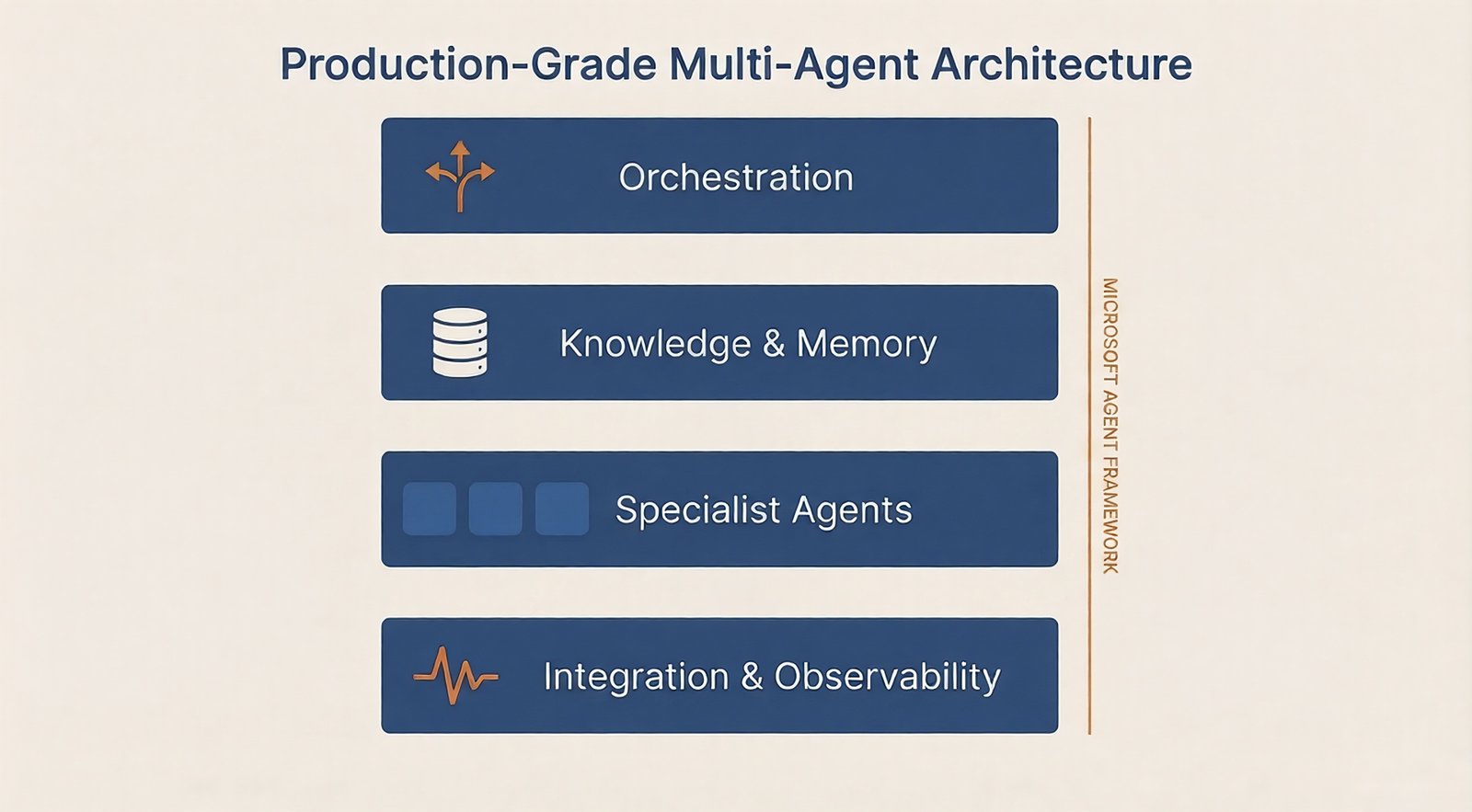
Production-grade multi-agent reference architecture. Microsoft Agent Framework orchestrates specialist agents across local and remote environments, with full observability at every layer.
Most teams don't struggle with building one agent. They struggle with what happens when they need five agents coordinating across three systems with full audit trails and no single point of failure. That's what we architect.
Security & Governance
Agents that act need guardrails. We build them in from day one.
Autonomous agents introduce risks that chatbots don't: prompt injection, over-permissioning, data exfiltration via tools, and emergent behaviors in multi-agent pipelines. Nearly 80% of organizations say they can't yet share data across teams in ways that make agentic AI safe. We take that seriously.
Risks we design against
- Prompt injection and adversarial inputs
- Over-permissioned agent identities
- Data exfiltration through tool calls
- Unpredictable behavior in multi-agent systems
Controls we build in
- Entra Agent IDs with scoped least-privilege RBAC
- Azure AI Content Safety + prompt shields
- Human-in-the-loop approval for high-risk actions
- Full audit trails via Foundry thread logs + OpenTelemetry
What You Get
Every workstream ends with something your team can own and operate
Agent Use Case Brief
Scoped problem statement, success metrics, data flow map, and ROI model for your first agent deployment.
Agent Architecture Document
Full technical design: agent type selection, tool registry, connector patterns, identity design, and multi-agent coordination model.
Security & Governance Runbook
Entra Agent ID configuration, RBAC policies, content safety thresholds, red team test results, and incident response procedures.
Observability Setup
Foundry thread logging, OpenTelemetry tracing, Azure Log Analytics dashboard, and alert configuration, so you can see every agent decision.
Production Agent(s)
Deployed, tested, and hardened agents running in your Azure AI Foundry environment, connected to your systems and governed by your policies.
Operations & Handoff Documentation
Runbooks, prompt management guides, tool update procedures, and escalation paths, written for your internal IT team, not a PhD.
30-Day Post-Launch Review
Usage metrics, incident review, prompt refinement, and a prioritized backlog for Phase 2 expansion.
Phase 2 Roadmap
Data-driven recommendation for expanding to adjacent workflows, additional agent types, or multi-agent orchestration, when you're ready.
Is This Right for You?
Enterprise agents are powerful. They're also not for everyone yet.
This is a strong fit if...
- You have active Microsoft 365 and Azure usage
- You have a specific, repetitive, multi-system process that's burning staff hours
- Your IT team wants to own the agents long-term, not just the vendor
- You've done basic Copilot adoption and want the next layer
- You have executive sponsorship and a cross-functional team ready to engage
You may not be ready yet if...
- Your Microsoft 365 or Azure environment isn't configured or governed yet
- You don't have a specific use case, just general interest in "AI agents"
- Your data is siloed and you have no plan to address that
- You're looking for a set-and-forget automation (agents require ongoing governance)
Not sure where you are? Start with our Copilot Readiness Assessment, it surfaces data, governance, and integration gaps that also matter for agent readiness.
Questions
What IT leaders ask us before starting an agent project
Ready to Move Beyond Copilot?
Start with the right use case. Build something your team can own.
Most agent projects fail because they start too broad or skip the governance foundation. We've seen the failure modes. Our discovery process is designed to surface the right first use case, validate your data and identity readiness, and give you a realistic roadmap, before you commit to a build.