AGENTS & AUTOMATION
AI agents that automate your Microsoft 365 workflows without the maintenance nightmare.
64% of employees lack the time and energy to do their best work because of digital debt: manual approvals, status reporting, document routing, and data entry that eats their week. This page shows how Microsoft-native workflow agents can be designed so your IT team can maintain them directly.
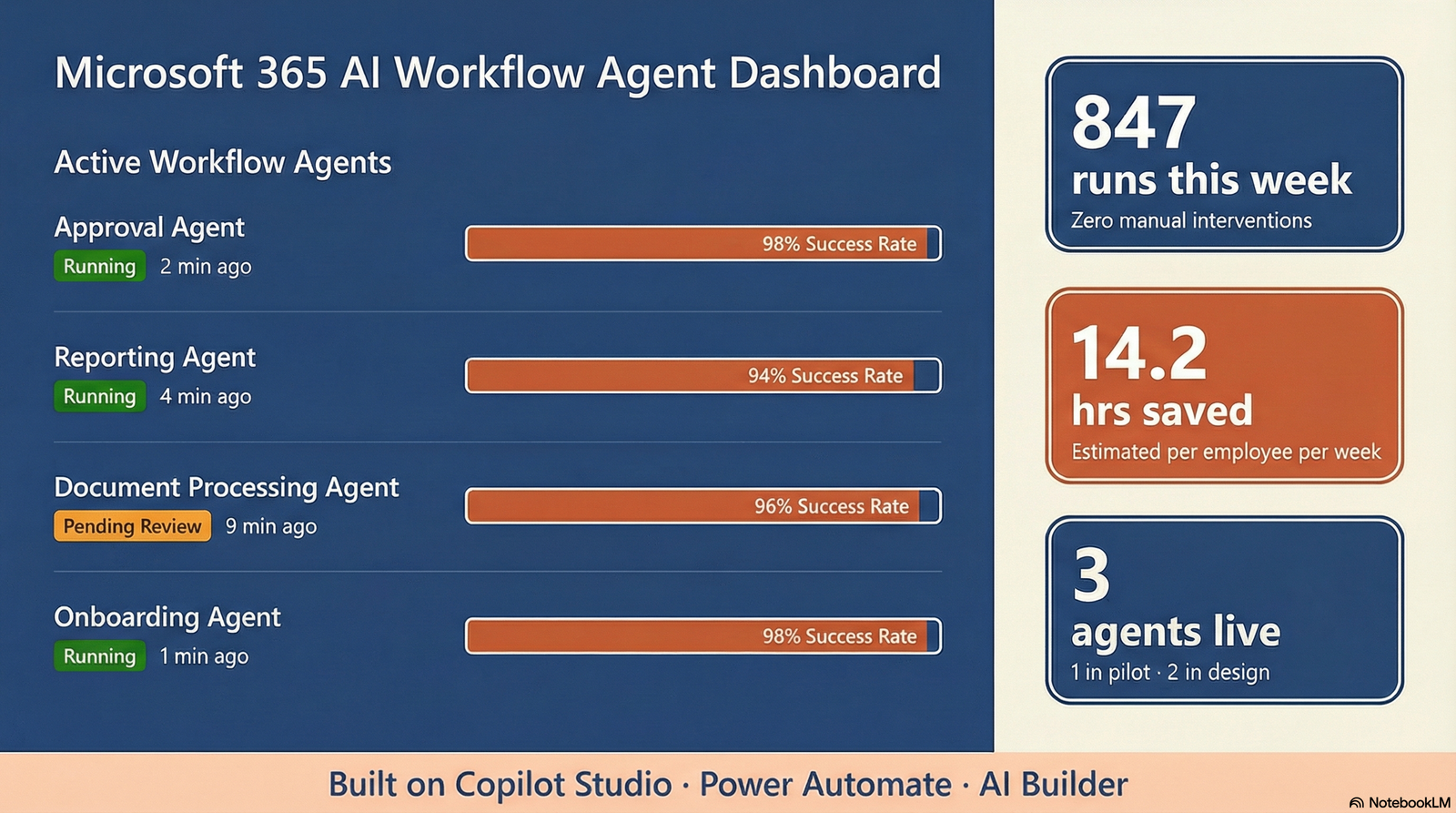
THE PROBLEM
Why automation projects keep failing your teams
Most organizations have tried automation before. The flows break. The internal team inherits something brittle. Nobody can fix it quickly. Here is why, and what changes the outcome.
Brittle rules break on exceptions
Rule-based automation encodes a narrow happy path. When an invoice layout changes, a subject line shifts, or a new exception type appears, flows fail silently and busy teams do not have capacity to investigate.
Flows tied to people, not processes
Many organizations have dozens of undocumented flows tied to individual user accounts. When that person changes role or leaves, the automation stops working, and nobody knows how to fix it.
The dependency trap
Complex flows get built, but internal IT lacks the skills, documentation, or permissions to modify them safely. Automations slowly degrade and eventually get turned off.
Traditional tools can't handle judgment calls
Rigid rules cannot decide whether an exception can be auto-approved or needs human review. Everything becomes a manual override, and the automation that was supposed to save time creates more work.
Microsoft's 2023 Work Trend Index reports that 64% of employees lack the time and energy to do their jobs because of digital debt, and that this makes them 3.5x more likely to struggle with innovation. AI agents designed for maintainability are the practical answer.
Source: Microsoft Work Trend Index 2023
WHAT WE BUILD
Six workflow agent types for Microsoft 365 teams
Each agent is scoped to a specific workflow, built on Microsoft-native tools, and designed for your IT team to own after we hand it off.
Approval Agents
Multi-step approval chains surfaced as adaptive cards in Teams or actionable emails in Outlook. Handles routing, escalation, reminders, and audit logging. No more approval chains buried in email threads.
TEAMS · OUTLOOK · SHAREPOINTReporting Agents
Recurring reports generated automatically from SharePoint lists, Excel, Dataverse, and connected systems. Posted to Teams channels or emailed to leadership on schedule. No manual data pulls.
TEAMS · SHAREPOINT · EXCELDocument Processing Agents
AI Builder extracts fields from invoices, contracts, and intake forms. Routes documents, validates data, writes to target systems, and flags low-confidence extractions for human review before they cause problems.
AI BUILDER · SHAREPOINT · DATAVERSEOnboarding & Offboarding Agents
Orchestrates IT and HR setup when people join or leave: Entra ID provisioning, license assignment, Teams channel invitations, SharePoint permissions, Planner task creation, and manager notifications.
ENTRA ID · TEAMS · PLANNERMeeting Intelligence Agents
Processes Teams meeting transcripts to extract action items and decisions, creates Planner tasks, sends summaries to participants, and follows up on overdue items. No more lost commitments.
TEAMS · PLANNER · OUTLOOKCross-Platform Integration Agents
Connects Microsoft 365 to Salesforce, HubSpot, ServiceNow, Dynamics 365, SAP, and other systems via Power Automate connectors and custom APIs. Data flows between systems without manual re-entry.
POWER AUTOMATE · API · CONNECTORSBuilt on tools you already own
Every agent we build uses Copilot Studio, Power Automate, and AI Builder, Microsoft tools included in licenses many organizations already have. No new platforms. No vendor lock-in. No hidden runtime costs that appear after go-live.
Security and governance by design
Agents authenticate via Microsoft Entra ID and access data through Microsoft Graph with least-privilege scoping. Every agent run is logged. Human-in-the-loop controls are built into every high-stakes workflow, not bolted on after something goes wrong.
OUR PROCESS
From workflow chaos to reliable agents in 6–10 weeks
A structured workstream with clear deliverables at every phase. Built for handoff from day one.
WEEK 1–2
Workflow discovery
We map your current manual workflows using a structured assessment: frequency, effort, error rate, and strategic value. Output is a prioritized automation backlog, ranked by ROI, not by what is technically easiest.
- Workflow discovery workshop with IT and business leads
- Frequency × effort × error rate scoring for each flow
- Identify automatable vs. broken processes
- Confirm Microsoft 365 license scope and tool access
WEEK 2–3
Agent design
We design the agent architecture: trigger, actions, exception handling, escalation paths, and human-in-the-loop controls. Every design decision is documented in plain English so your IT team can understand and maintain it.
- Trigger and action mapping for each agent
- Exception and escalation flow design
- Security and permission scoping
- Documentation framework established
WEEK 3–6
Build and test
We build agents in Copilot Studio and Power Automate, run parallel testing alongside existing manual processes, and validate accuracy and reliability before any production cutover. Your IT team is involved throughout so knowledge transfers during the build, not after.
- Agents built in your tenant, not a separate environment
- Parallel run with manual process before cutover
- Error logging your IT team can read and act on
- Test scripts and UAT checklist included
WEEK 6–8
Pilot and validate
Each agent runs with a pilot group first. We measure accuracy, exception rate, and user satisfaction against defined go/no-go criteria before full deployment. Issues found in pilot are fixed before they affect your whole organization.
- Pilot group: 10–20 users per agent
- Accuracy and exception rate measurement
- User satisfaction check-in
- Go/no-go criteria defined and reviewed
WEEK 8–10
Handoff and documentation
Full production deployment with complete handoff documentation: flow diagrams, runbooks, test scripts, and an escalation path for issues. We train your IT team to own every agent before the work concludes.
- Runbook for every agent deployed
- IT training session: how to modify, monitor, disable
- Monitoring dashboard configured in Power Automate
- 30-day post-handoff support window
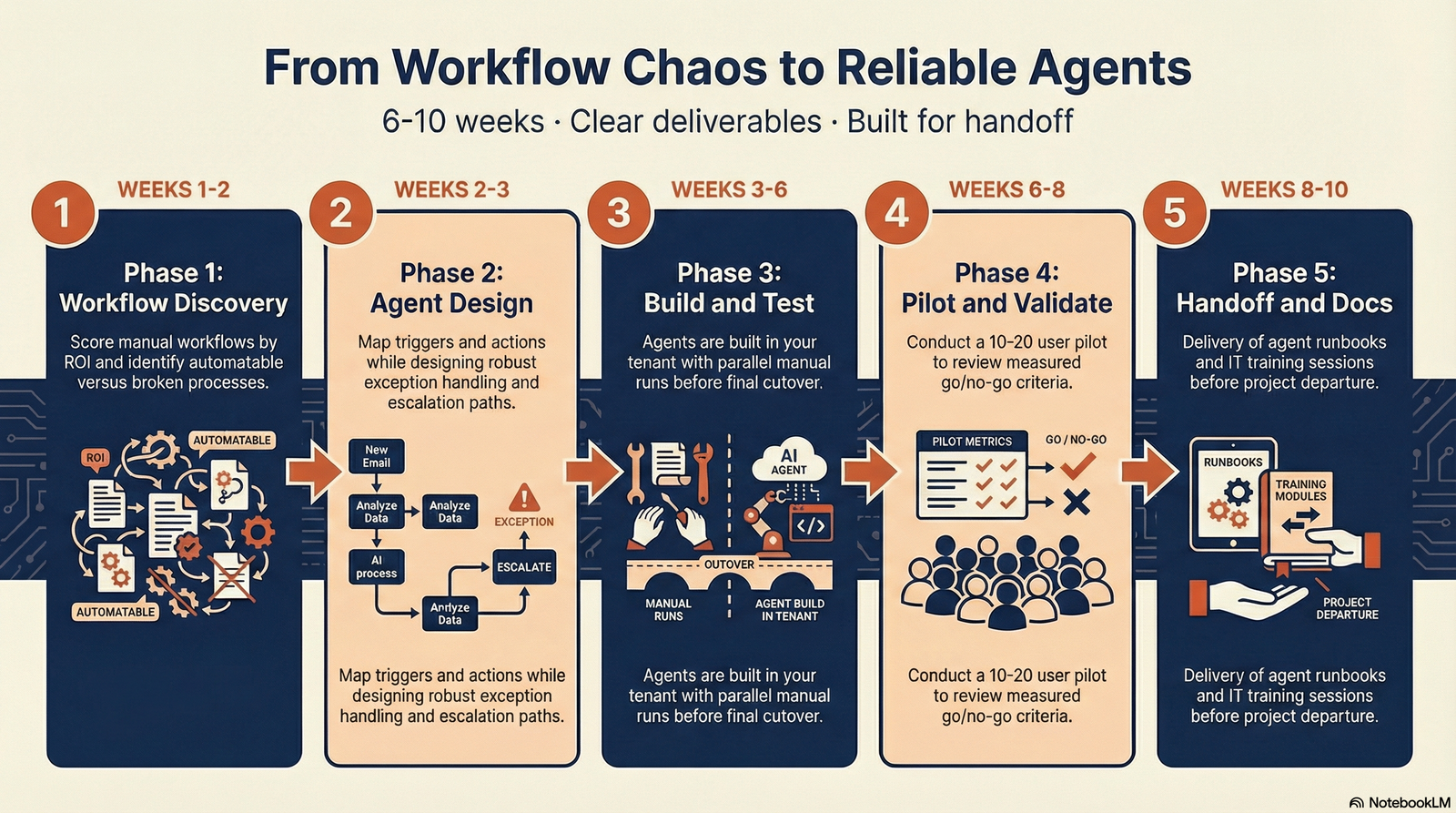
Every workstream follows this five-phase process. Clear outputs at every step. Built for your IT team to own.
WHAT YOU GET
Concrete deliverables.
Everything documented, tested, and handed off. Built to outlast the initial build.
Automation Backlog & Priority Matrix
Every workflow candidate scored by frequency, effort, error rate, and strategic value. Shows exactly which agents to build first and why, with a sequenced roadmap for later phases.
Agents Built in Your Tenant
All agents built directly in your Microsoft 365 tenant using Copilot Studio and Power Automate. No external platforms, no subscription handoffs, no migration required after delivery.
Runbook for Every Agent
Plain-English documentation for each agent: what it does, what triggers it, how to modify it, how to disable it, and what to do when it fails. Written for an IT team, not a developer.
Monitoring Dashboard
Power Automate run history and alerting configured so your IT team can see agent status, failure rates, and exception counts at a glance, without digging through logs.
IT Handoff Training
A live training session with your IT team covering how to monitor, modify, and extend each agent. Includes test scripts, troubleshooting guides, and an escalation path for issues beyond internal capability.
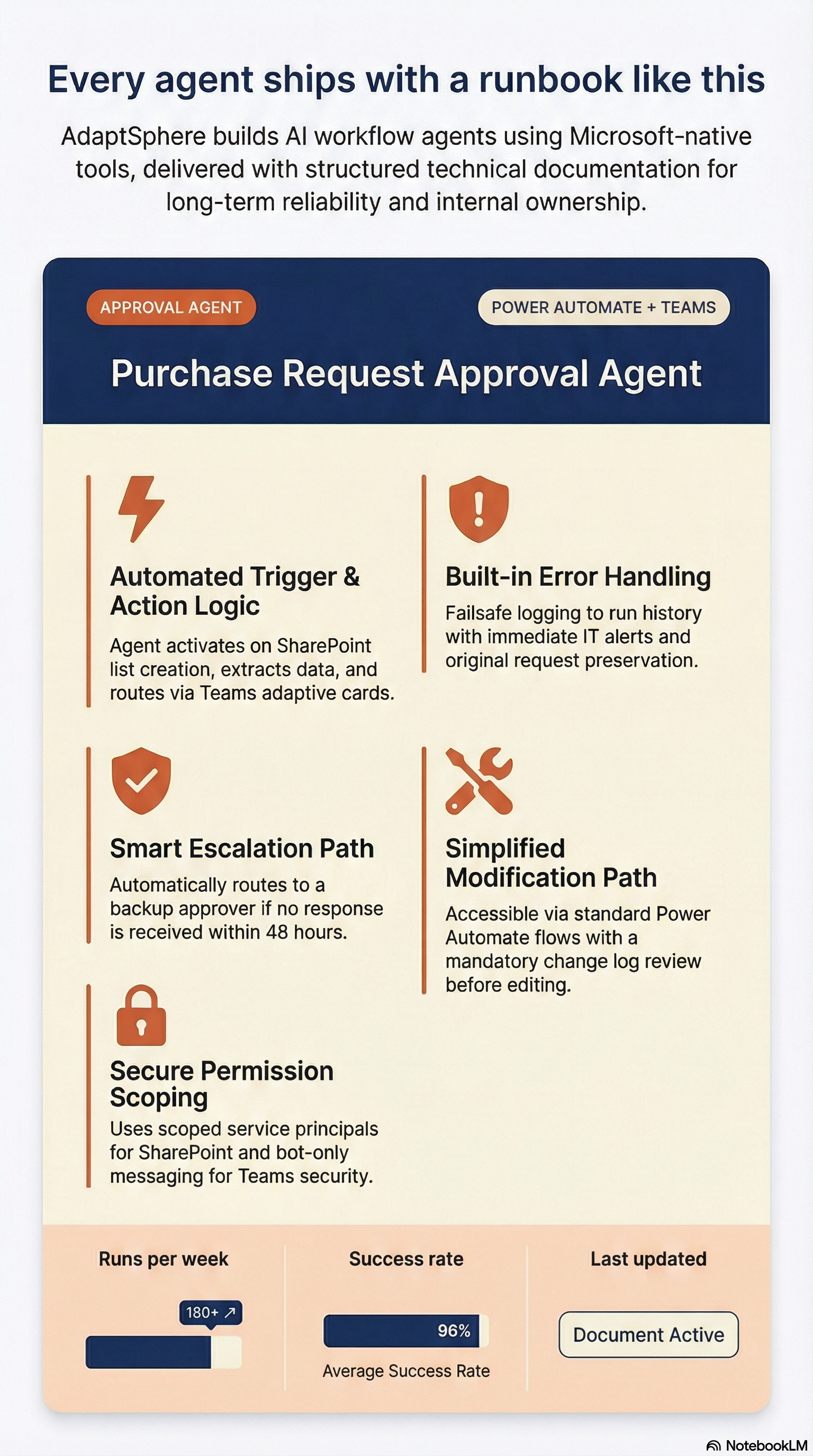
Every agent ships with a runbook your IT team can use to own and maintain it independently.
RIGHT FIT
Built for teams that want automation that actually lasts
This is for you if...
- You have Microsoft 365 and Power Platform licenses but manual processes are still eating your team's week
- You have tried Power Automate flows before and they broke or got abandoned
- IT leadership is asking why automation investments never seem to stick
- You need approval, reporting, or document processing automation that works reliably without a developer
- You have 50–500 employees and a Microsoft-centric environment
- You work in professional services, finance, healthcare-adjacent, nonprofit, or government contracting
This is probably not for you if...
- You want fully autonomous AI with no human-in-the-loop controls (not yet appropriate for most business workflows)
- Your primary systems are entirely outside the Microsoft ecosystem with no available connectors
- You are looking for a one-day workshop with no implementation follow-through
- Your IT team wants to own the build entirely with no external design input
- You need enterprise-scale multi-agent orchestration. That is a separate, larger body of work.See what's possible at enterprise scale →
COMMON QUESTIONS
What people ask before they start
NEXT STEP
Stop rebuilding broken workflows. Build agents that run reliably and your team can maintain.
The workflow agent workstream typically takes 6–10 weeks and delivers production agents with full runbook documentation, IT training, and a monitoring dashboard. Agents your team owns from day one.